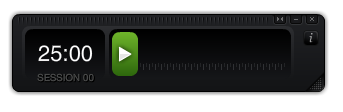
Focus Booster is a simple software tool to use with the Pomodoro Technique . You can start a Pomodoro with this, it runs for 25 minutes on your desktop (while gradually changing color from green to red), rings a bell and then times a 5 minute break for you. After this break, you can start a new Pomodoro time slot. Focus Booster also keeps track of the amount of Pomodoros you've accomplished over the day.
Previously, I was using the stopwatch on my cell phone to see if I can concentrate for 20 to 45 minutes before changing tasks (I was nicknaming this the "egg timer trick", but now that I am continuously with my eyes glued to my computer screen, I thought I could try a little app for this.
Here are some of my observations:
- I like how it "forces" me to take breaks. I've noticed that I can work the entire morning with only a few breaks, but then I feel really empty and unable to work in the afternoon and evening. Taking little breaks has helped me to be able to work more productively throughout the entire day, without burning all my energy in the morning.
- Having an app on your screen makes it very visible. It challenges me to start racing against the clock in the last five minutes of a 25-minutes slot. It also tells me that after 5 minutes of browsing the internet, I need to get back to my calculations.
- Whenever another thought crosses my mind, I just write it down on a piece of paper and get back to it later. And this "later" doesn't feel so far away, as every chunk of time is only 25 minutes.
- This method feel intuitively right for me. I used to work in time slots of 20 minutes, as this used to be the amount of time that I was spending on my homework in secondary school. When I went to university, I simply felt I could not really concentrate deeply for longer than 20 minutes, so I started to divide my time in sets of 20 minutes each (trying to study one proof at a time, for example).
Even though I'm not really familiar with the original Pomodoro Technique, I've been easily able to implement this software tool into my regular way of working, and by doing so, found a way to optimize my "egg timer trick" method.
If you are interested in the Pomodoro Technique itself, and how you could implement it into your work and benefit from it, I recommend the following blog posts as well:
Easily Stop Procrastination in its Tracks and Become a Productivity Machine: One Tomato at a Time
Productivity help with Pomodoro

0 comments:
Post a Comment